Assign average holiday pay scheme to an employee
Before you begin:
Set up Average Holiday Pay schemes
-
Open the required company.
-
Go to Employees.
-
Select the required employee.
-
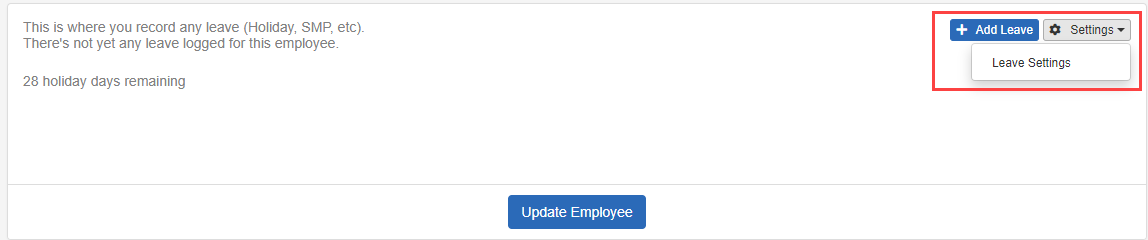
Go to Settings and select Leave Settings.
-
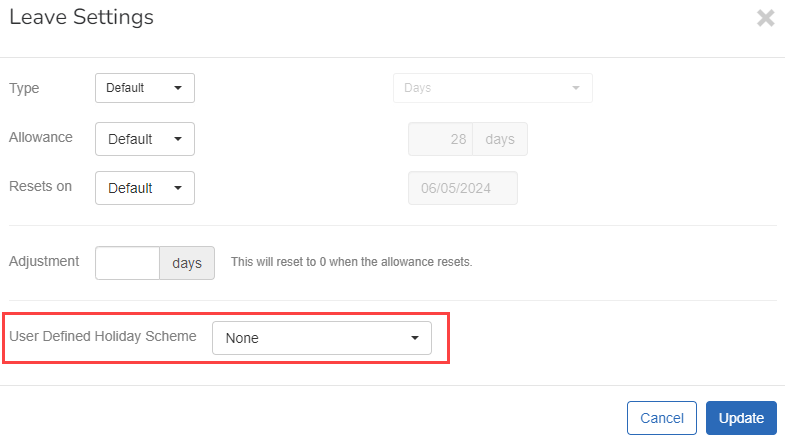
Select the required User Defined Holiday Scheme.
-
Select Update.
When a new starter inherits a default holiday scheme of the average or enhanced type, the underlying average scheme is now attached automatically. Where multiple average holiday If an Employee's work has no fixed or regular hours, their holiday pay will be based on the average pay they received over the previous 52 weeks (or a average based on the available number of weeks if less than the full 52. pay schemes exist, the first days-type scheme in the list is selected by default.