Getting started as a new HR customer
Use this topic if you are an existing Staffology Payroll customer and are setting up the integration with Staffology HR for the first time.
Before you integrate
Activate the Company checkbox
-
Sign in to Staffology HR.
-
Go to System Tools > Utilities > Tools > System Configuration.
-
In the Contract section, select the Company Field checkbox.

-
Select Save.
Set up a company in HR
-
Create a your company in HR before you continue this setup.
Return to this page when you have set it up.
Set up the integration
Create an API Key in Staffology Payroll
-
Sign in to Staffology Payroll.
-
Go to the top right of the screen, select your initials, then choose API Keys.

-
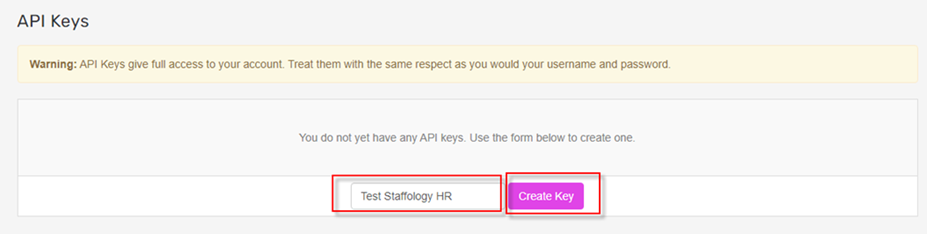
Enter a name and select Create Key. Copy the API key. You will use this in HR.
Activate Staffology Payroll in HR
-
In Staffology HR, go to System Tools > Utilities > System Configuration.
-
Within the Payroll Integration section, select Staffology Payroll.

-
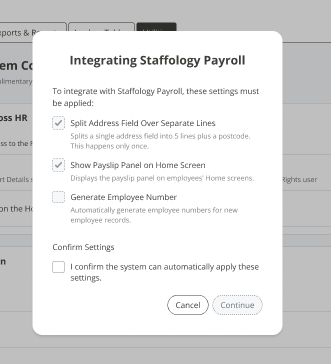
Review the information in the pop-up and select the confirmation box.
-
Select Continue.
-
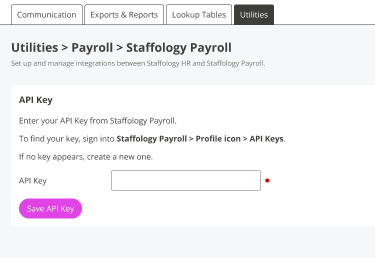
Enter your API Key from Staffology Payroll and select Save API Key.
Link HR and Payroll
-
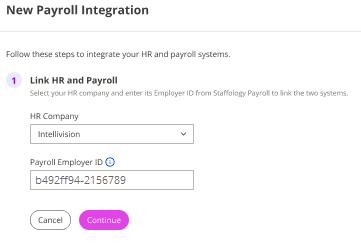
Select your HR Company from the list.
-
Enter your Employer ID from Payroll.
-
To find the Employer ID, in Payroll select your company name from the top menu, then choose Edit Details

-
- Select Continue.
Choose whether to add Payroll employees to HR
-
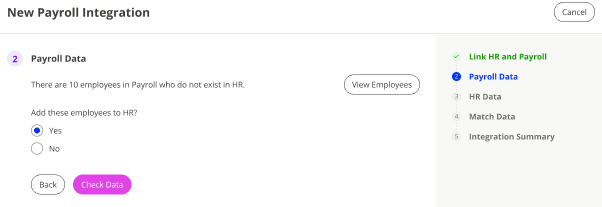
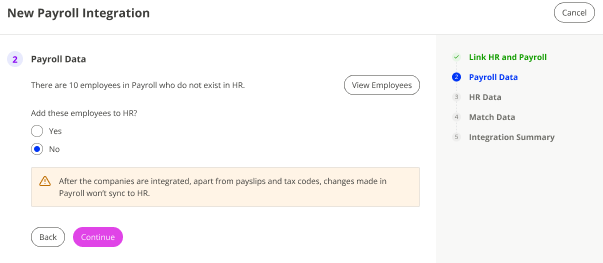
You are asked if you want to add employees that exist in Payroll but not yet in HR.
-
Select View Employees to open a list of employee names
If you want to add employees from Payroll
-
Select Yes.
-
Select Check Data.
-
Continue to Step 18.
If you do not want to add employees
-
Select No, then choose Continue.
-
Skip to Step 18.
-
Check Data
-
The system checks for data issues.
If errors are found
-
Download the report
-
Fix the issues in Staffology Payroll.
-
Return to HR and select Recheck Data
-
Repeat until there are no errors
-
Select Continue and go to Step 19.
No errors
-
Select Continue. Go to Step 19.
-
Integration Summary
Once you complete the integration, HR becomes the source of truth for most employee data. To understand what this means for your data syncs, refer to How data syncs with Staffology Payroll
-
Review the summary. Select Integrate Companies to link your HR and Payroll companies.
Complete the integration
-
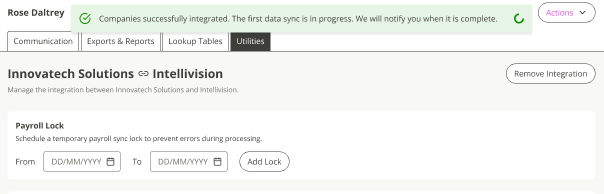
A success message confirms the integration is in progress. You will receive a notification when the first data sync is complete.
Learn how toCreate a new payment or deduction, with or without linking to Payroll