Create a Lookup
Lookups are drop-down lists found in several areas of the system, including in the Personal, Contract, and Payroll tabs.
You can amend these lookups and add options specific to your company.
You can select some of the labels in the My Details tabs for a shortcut to adding a lookup. Only Set Rights users can select the labels.
To create a lookup option:
-
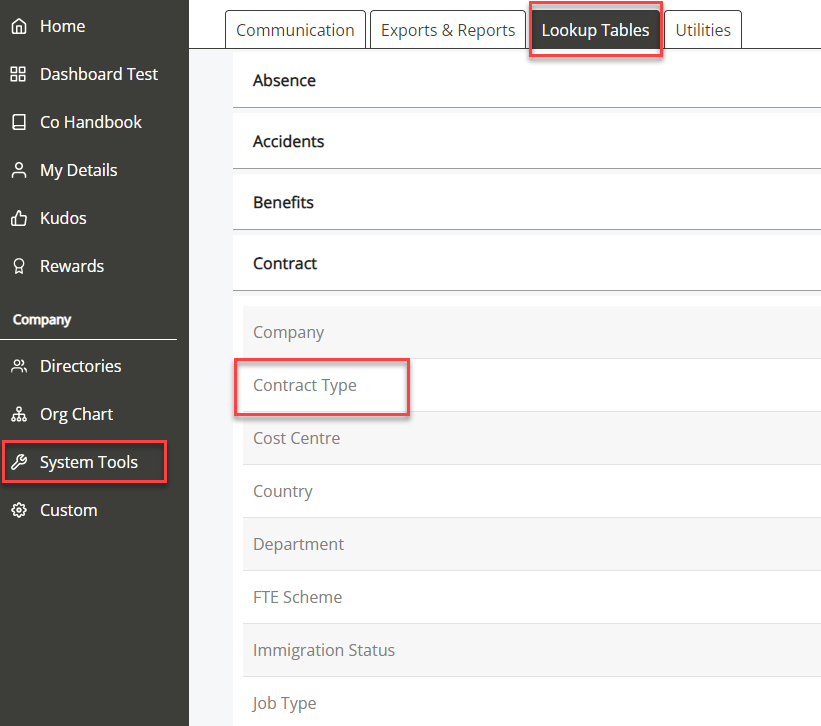
Go to System Tools, and then select Lookup Tables.
-
Choose an option from the list of headings. For example, Contract Type.
-
Select Create New and complete the required fields.
-
Repeat to add more options to the drop-down.
-
You can check if the option has added to the lookup. For example, if you added a new option for Contract Type, go to My Details, and then select Contract.
-
Select the Contract Type drop-down.